
49 lines
1.7 KiB
Markdown
49 lines
1.7 KiB
Markdown
# Marketplace Bay Bot
|
|
|
|
My vibe code for the marketplace bay bot
|
|
|
|
## 1. How to use bare metal on linux : -
|
|
- Download the repo, cd into the directory
|
|
- Choose which bot you want to run -
|
|
```
|
|
DSbot.py = Discord Bot
|
|
GTbot.py = Telegram Group Topics bot
|
|
DMbot.py = Telegram Bot DM bot
|
|
```
|
|
- Edit the values of the example.env file accordingly and rename the file to ```.env```.
|
|
- Run these commands =
|
|
```
|
|
sudo apt install python3-pip python3-venv
|
|
tmux new -s mpb
|
|
python3 -m venv venv
|
|
source venv/bin/activate
|
|
pip install python-telegram-bot requests python-dotenv discord.py
|
|
python3 <name of the bot you want to run for group or for DMs>.py
|
|
```
|
|
- press ```ctrl + b + d``` and profit
|
|
- to go back into the console at any time run ```tmux a```
|
|
|
|
### P.S. Special configuration for the discord bot ```DSbot.py```: -
|
|
|
|
You need these permissions scoped in the Discord developer portal before you add the bot to a server.
|
|
|
|
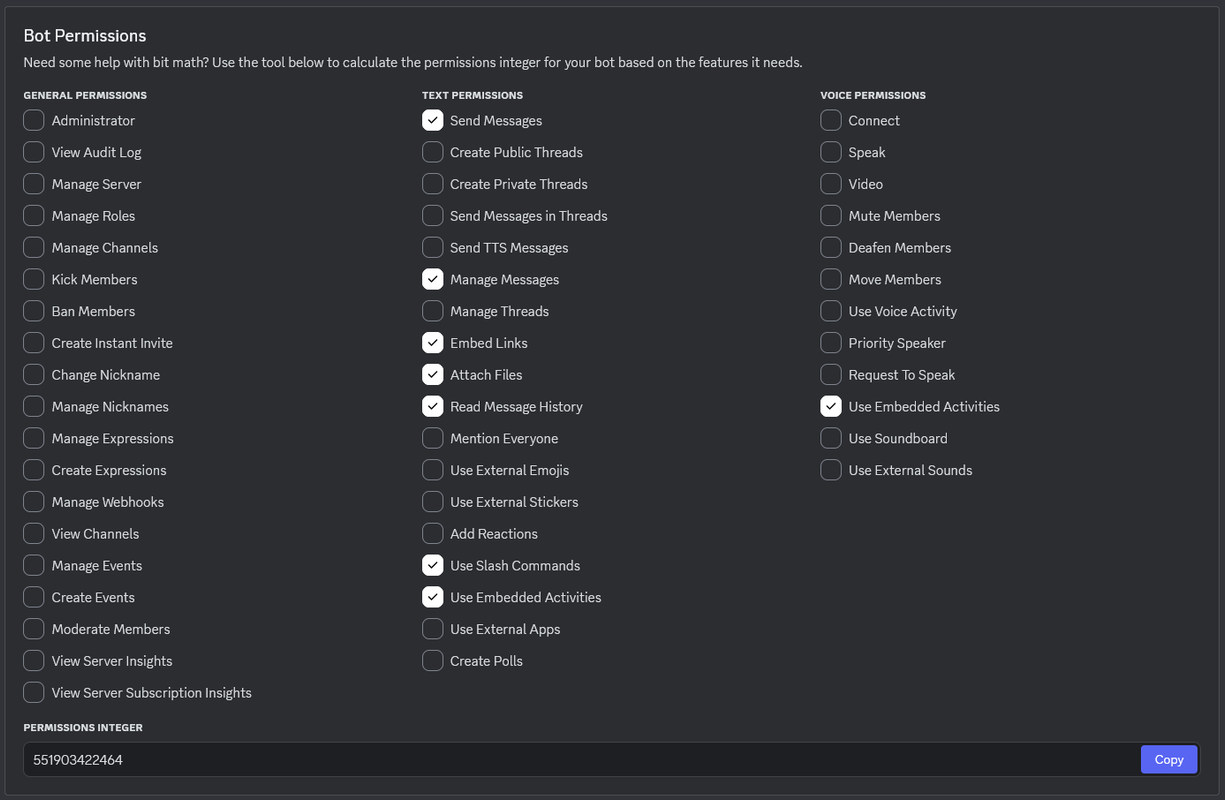
|
|
|
|
## 2. How to use with Docker Compose : -
|
|
- Download the ```compose.yml``` file from the docker directory
|
|
- download ```example.env```, change it accordingly and rename it to ```.env```
|
|
- edit the line for container_name and image in the ```compose.yml``` file to use the image you want to run from one of these -
|
|
|
|
```ghcr.io/driftywinds/mpbot:latestDS```
|
|
|
|
```ghcr.io/driftywinds/mpbot:latestDM```
|
|
|
|
```ghcr.io/driftywinds/mpbot:latestGT```
|
|
- run ```docker compose up -d```
|
|
|
|
## 3. How to build a docker image : -
|
|
- download / clone the repo
|
|
- move / copy the respective Dockerfile to the root of the repo
|
|
- run ```docker build . -f Dockerfile-GTbot.py -t your-image-name:tag```
|
|
- go into the docker directory and edit the ```compose.yml``` to use the image you built
|
|
- run ```docker compose up -d``` |