2.1 KiB
2.1 KiB
Marketplace Bay Bot
My vibe code for the marketplace bay bot
There are mainly two ways to run the bot, bare metal (you install dependencies to the machine) or docker compose (you containerize the bot).
This is how you set them up : -
1) Bare Metal on Linux : -
- Download the repo, cd into the directory
- Choose which bot you want to run -
DSbot.py = Discord Bot
GTbot.py = Telegram Group Topics bot
DMbot.py = Telegram Bot DM bot
MTbot.py = Matrix bot for an unencrypted room (should technically work with unencrypted DMs too but I haven't tested it)
- Edit the values of the example.env file accordingly and rename the file to
.env. - Run these commands =
sudo apt install python3-pip python3-venv
tmux new -s mpb
python3 -m venv venv
source venv/bin/activate
pip install python-telegram-bot requests python-dotenv discord.py
python3 <name of the bot you want to run for group or for DMs>.py
- press
ctrl + b + dand profit - to go back into the console at any time run
tmux a
2) Docker Compose (recommended) : -
-
Download the
compose.ymlfile from the docker directory -
download
example.env, change it accordingly and rename it to.env -
edit the line for container_name and image in the
compose.ymlfile to use the image you want to run from one of these -ghcr.io/driftywinds/mpbot:latestDSghcr.io/driftywinds/mpbot:latestDMghcr.io/driftywinds/mpbot:latestGTghcr.io/driftywinds/mpbot:latestMT -
run
docker compose up -d
2.1) How to build the docker images : -
- download / clone the repo
- move / copy the respective Dockerfile to the root of the repo
- run
docker build . -f Dockerfile-GTbot.py -t your-image-name:tag - go into the docker directory and edit the
compose.ymlto use the image you built - run
docker compose up -d
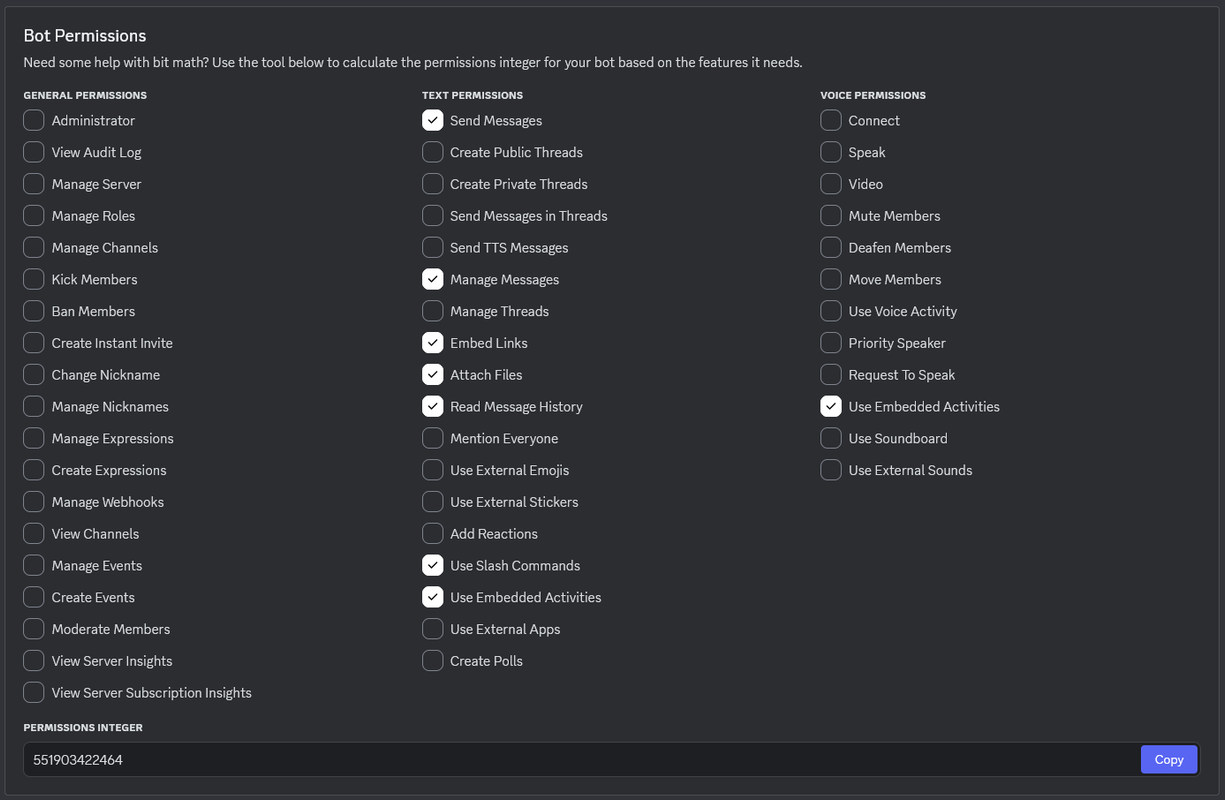
P.S. Special configuration for the discord bot DSbot.py: -
You need these permissions scoped in the Discord developer portal before you add the bot to a server.